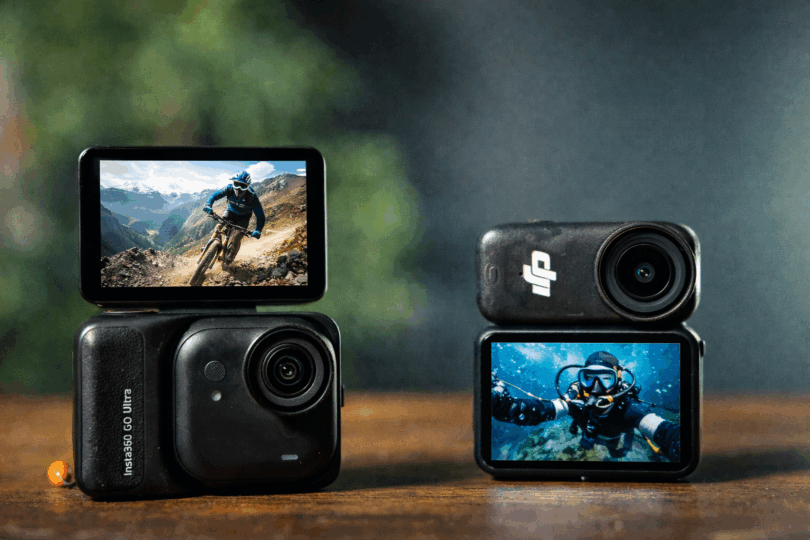

Regular action cameras are a big deal and have been around for a while, ever since GoPro started so many years ago. GoPro has become quite stagnant over the years which has given room for Insta360 and DJI to hit this market hard. And they are at it again with their latest pocket action cameras – the Insta360 GO Ultra vs the DJI Osmo Nano. Which one is best for you?
Insta360 GO Ultra vs DJI Osmo Nano
The links below are affiliate links that support the site.
Link: Insta360 GO Ultra ($379) (direct from Insta360) | DJI Osmo Nano 128GB ($329)
Wearable pocket action cams are having a moment for a simple reason: they capture true POV without the hassle of a full-size action cam on a chest rig or head strap. Two of the biggest names here are the Insta360 GO Ultra and the DJI Osmo Nano—both modular, both magnetic, both built for hands-free shooting… but with very different personalities.
Below is a real-world comparison that focuses on what actually matters when you’re running, traveling, vlogging, or filming day-to-day life.
Quick snapshot: what each camera is “best at”
Insta360 GO Ultra is the “just make it look good” camera: higher headline capture specs, strong stabilization, a bigger touchscreen on the pod, and a very friendly workflow—especially if you like fast edits straight from your phone. It uses microSD only and supports very large cards (up to 2TB).
DJI Osmo Nano is the “make it look good in editing” camera: good image quality, 10-bit color + log (D-Log M) options for grading, built-in storage (64GB or 128GB models) plus microSD support, and deep integration with DJI’s mic ecosystem. For those that are not familiar with 10-bit color, it means that there is a mode that lets you capture more colors overall and this is used specifically for editing after as it lets you push the colors more without the banding of colors that can occur with 8-bit.
When it comes to capturing content with a mini action camera and then posting it wherever you want it to go, the one that will help you do that cleaner and faster and looking great is the Insta360 GO Ultra.
Camera Design
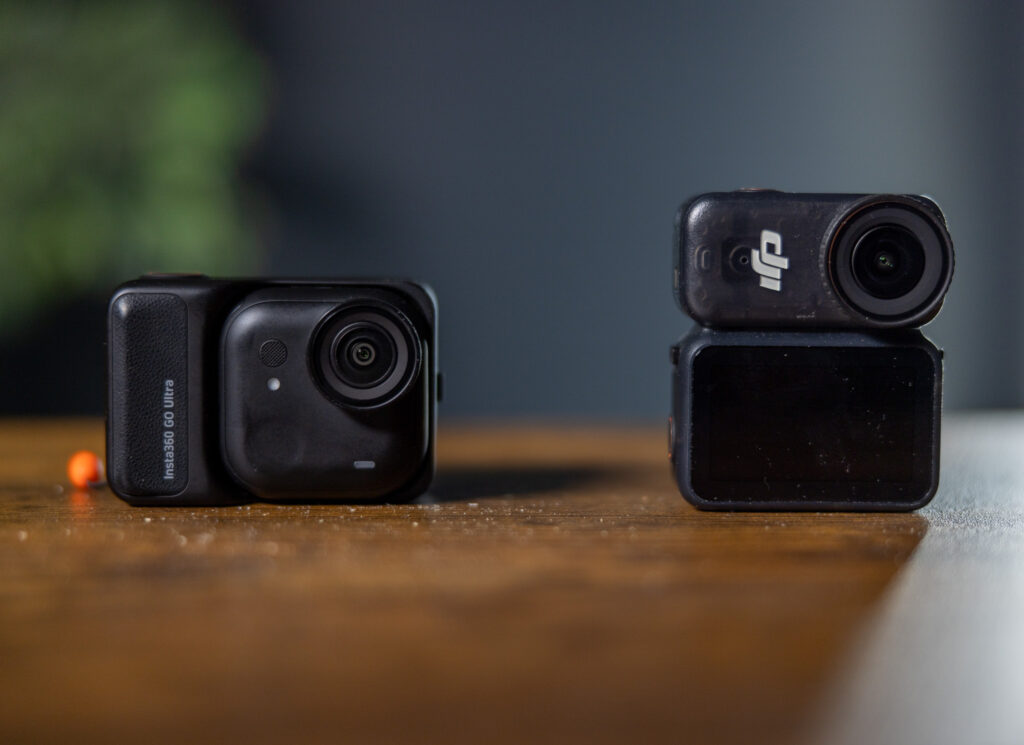
Both cameras are very tiny for action cameras but they are also different designs. DJI used to have a tiny action camera – the Action 2 – that was cubed shaped but overheated. Now, they went for the pill-format that the earlier GO series cameras used to have.
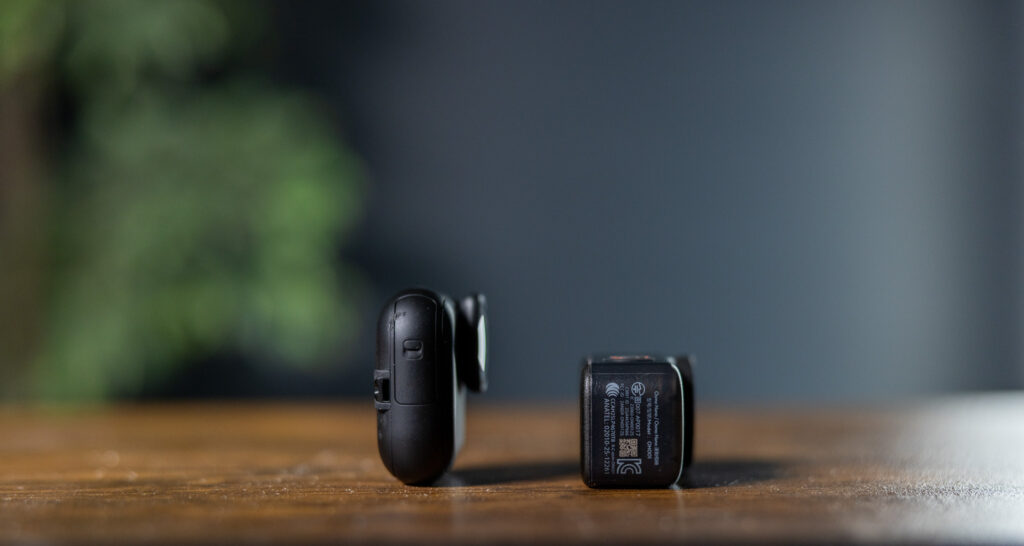
Insta360 now has a square shaped form factor. It actually makes it easier to handle and shoot with. In real-world use, I much preferred the GO Ultra than the Nano. The Nano, both on the dock and not, was more awkward to hold. The GO Ultra is easy to hold by itself and in the pod, it feels more like a traditional (although tiny) camera.
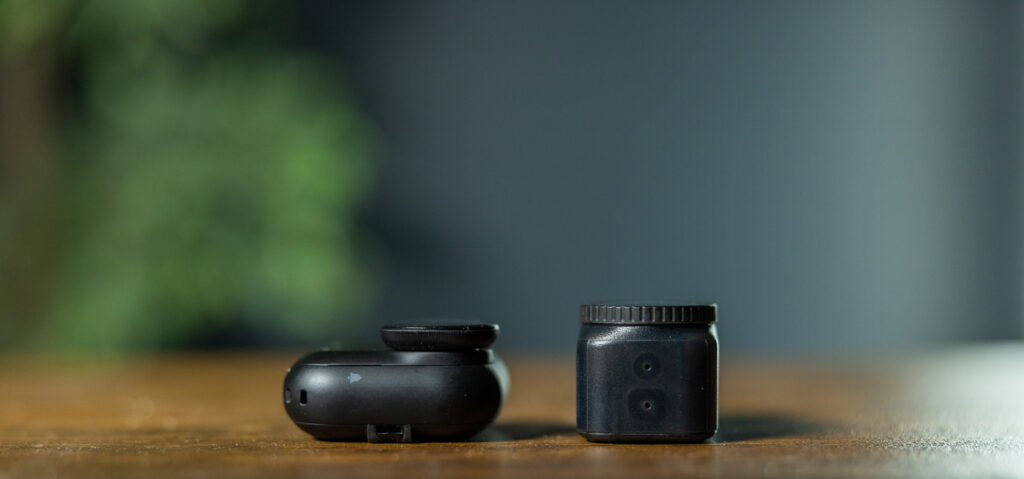
DJI likes to really put their branding bright and clear on their products now so there will not be any confusion that you are using a camera with the DJI! With the GO Ultra, it has no Insta360 branding on the front and if you wear it with the magnetic pendant, you could walk around with a dark shirt (with the black camera) or a light shirt (with the white camera) and not stand out so much that you are using a camera.
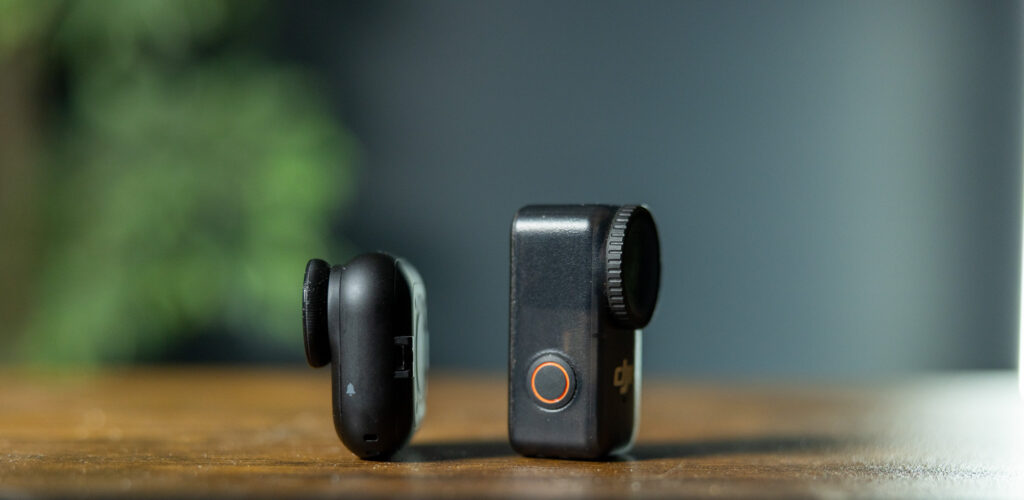
This is very helpful if you want to capture video of your travels. The DJI is more blockish and clearly stands out.
Specs that actually matter in the field
Sensor + resolution
-
GO Ultra: 1/1.28″ sensor, shoots 4K/60 and up to 50MP photos.
-
Osmo Nano: 1/1.3″ sensor, shoots 4K/60 and up to ~35MP photos.
On paper, the GO Ultra has a slight edge (sensor size + photo resolution + higher max video bitrate), while the Nano counters with color depth / log options that matter a lot if you grade footage.
Video bitrate (why you should care)
Bitrate is one of the quiet “quality multipliers”—it affects how well footage holds up when you stabilize, reframe, or push colors in editing. The larger the number, the more room you have for pushing the picture in editing.
-
GO Ultra: up to 180 Mbps
-
Osmo Nano: up to 120 Mbps
If you shoot a lot of foliage, city scenes, and fast movement (running/cycling), that extra bitrate on the GO Ultra can help preserve detail.
Stabilization + horizon leveling
-
GO Ultra: FlowState + “360 Horizon Lock” style leveling.
-
Osmo Nano: RockSteady 3.0 + HorizonBalancing.
In practice, both are very good but there were situations when running with it my hand (I ran with it like this for comparison shots that you can see on the video comparison above). Your bigger differentiator tends to be mounting (where you place it) and whether your footage needs heavy correction in post.
Battery life: who lasts longer?
This is where the modular dock/pod matters. If you’re filming long runs, long rides, travel days, or events, the dock becomes your “power bank + screen + controls.” To get an idea of what the batteries could do, I tested them both for this in inside conditions at 67 degrees and like 70% humidity. Obviously, your use may differ depending on the scenarios you are shooting in (colder weather will make the battery go faster and warmer weather will make the DJI Nano overheat faster).
However, as helpful as the dock and pod are, for most use cases in a POV style, you are using it with the camera by itself. So, that is just as important in the scheme of things – how long the camera can last on its own.
The headline spec on both of these cameras is the 4K resolution at 60 frames per second. So, this is the main number I wanted to see, to know what these tiny cameras could deliver at these taxing specs. Both cameras have endurance modes that let you shut off some features to get more battery life. With the Insta360 GO Ultra, you still have ActiveHDR available in endurance mode.
-
GO Ultra: I was able to get 31:51 seconds in 4K/60. In Endurance Mode, I was able to get 58 minutes out of it at 4K30. The Action pod can take the battery from nothing to 80% in just 12 minutes while it takes more than 20 minutes (in most of my tests) to fully top it up to 100% and it has 46% left in the pod. This means you can get almost 2 full charges with the pods.
-
Osmo Nano (DJI specs): The Nano shut off at 28 minutes and 20 seconds with 20% left due to overheating. Endurance mode took it to 55 minutes at 4K30. It took 34 minutes to fill it up after it had died at 20% and the pod had only 22% left in it. This means you are only getting one full charge and maybe a 1/4 out of the dock charging the camera.
If you want to leave the cameras in their docks/pods, Endurance mode at 4K30 will get you a total of 170 minutes for the Insta360 and 120 minutes for the DJI.
If you want to use the cameras by themselves for things like a race, you will be able to film quite a bit of your race with either camera but the Insta360 GO Ultra will let you go longer in all battery areas, thanks to their battery tech used in the camera (while DJI uses previous tech for their battery).
Waterproofing: surprisingly similar (with a key caveat)
Both brands follow the same philosophy: the camera module is waterproof; the dock/pod is mostly not.
-
GO Ultra: standalone camera is IPX8 to 10m; Action Pod is IPX4 splashproof.
-
Osmo Nano: camera is waterproof up to 10m; dock is IPX4 splash resistant.
If you’re filming in heavy rain, mud, or water sports: plan on using just the camera module (or a dedicated dive case/solution).
Storage workflow: the biggest “daily use” difference
Insta360 GO Ultra: microSD only (but huge capacity)
GO Ultra relies on microSD and supports very large cards (up to 2TB).
Why it’s great: you can pack multiple cards for trips and never worry about filling internal memory.
Why it’s limiting: if you forget your card, you’re done.
This is the first camera in the GO series that does not use built-in storage and I am actually happy about that. The reason is that you ONLY had built-in storage before. Now, you inert a microSD card in the camera itself and it can take up to 2TB.
DJI Osmo Nano: built-in storage + microSD expansion
Osmo Nano comes in 64GB or 128GB internal storage versions, and it also takes microSD (up to 1TB).
Why it’s great: you can film even if you forgot your card
Why it’s limiting: if you’re a “shoot all day” person, you’ll still want microSD—especially at 4K/60.
And here’s the problem – the microSD slot is on the dock, not the camera. That means that you will only get expandable storage if you are running the camera on the pod. Otherwise, you are stuck with the internal storage. You will get around 1 hour of recorded footage at the highest settings on the 64GB, which is much longer than the Osmo Nano will last on its own so you won’t worry about it running out on one shoot.
Screens + usability (aka: can you actually use it mid-run?)
-
GO Ultra: Action Pod has a 2.5-inch touchscreen—bigger and easier for framing and playback. The GO 3 was the first camera from Insta360 to offer this hinged touchscreen and now this is the third edition of it in the GO series while they also use it for the Ace Pro lineup. This means that this hinge is excellent and will hold up for a long time.
The GO Ultra screen is perfect for all kinds of shooting angles and framing. The hinged screen can give you all the angles you need, including if you want to get selfie mode.
-
Osmo Nano: dock screen is 2 inches, and while totally usable, it’s smaller and can be harder to see in bright conditions. It is an OLED display which is better than the GO Ultra’s LED.
The only flexibility you get with the Nano’s dock display is being able to reverse it for selfie mode. It still does not help if you want different angles. It is a fixed display so if you want to go from a low perspective or overhead, or anything else that isn’t straight on, you will find the Nano extremely limiting.
If you’re filming yourself (vlogging, race narration, family moments), that bigger, hinged GO Ultra screen is a real quality-of-life win.
Audio: who sounds better?
Both have built-in mics and wind reduction options, and both are best when paired with a wireless mic if audio is mission-critical.
A key advantage for DJI: direct connection to up to two DJI Mic transmitters (depending on your setup), which can simplify your kit if you’re already in DJI world. If you already have the DJI mics, they will connect seamlessly with the Osmo Nano.
Also, the GO Ultra is compatible with Insta360’s tiny Mic Air. I have used this little mic for a while and it’s magnetic setup has a tiny profile which makes it work great for not giving the appearance of recording.
The noise rejection between these two cameras is good but Insta360 has more levels and handles noise rejection better.
Image quality and “the look”
In side-by-side testing and reviews, the consensus is basically:
-
GO Ultra tends to be more “auto-friendly,” with strong app-driven polish and high-bitrate capture.
-
Osmo Nano tends to appeal to people who want more deliberate control (10-bit/log) and who already shoot DJI (mics, workflow, color matching).
In other words: GO Ultra is optimized for speed, Osmo Nano is optimized for control for post processing. For most people, a mini action camera is one you are getting for those shots in tough spaces or for low profile shooting and then posting. Most people will not be getting one of these for more post processing. While both cameras are good for that and the Insta360 studio works great, the 10-bit color and log profile on the Nano will help you get more out of the color of the Nano for post processing.
For most users, the Insta360 GO ultra will be the one to go to.
Mounting and “wearability” for runners
If you’re a runner, you care about three things:
-
bounce/jitter
-
comfort
-
how quickly you can start recording
Both offer magnetic mounting and hands-free control options (gesture/voice features show up in real-world comparisons).
My practical guidance:
-
For running POV, prioritize a stable chest mount or a snug hat/headband mount. The less the camera flops, the better stabilization works.
-
For race-day storytelling, the dock/pod screen matters more than you’d think—being able to quickly check framing without pulling out your phone is huge.
Price and value and availability
The DJI Osmo Nano (128GB) costs $329 and the Insta360 GO Ultra costs $379. The Nano took awhile to become available in the US due to the uncertainty around DJI being allowed to continue to sell their drones in the US. Now a ban has been. put in place but it doesn’t apply to DJI products that have already been approved by the FCC for sale in the US. There may be issues in the future since it had appeared that DJI shipments were being held up by customs.
Which should you buy? (simple decision guide)
Choose Insta360 GO Ultra if…
-
You want the easiest path to great-looking POV clips and quick edits.
-
You care about a bigger screen and a friendlier on-device experience.
-
You shoot a lot and like the idea of 2TB microSD capacity.
-
Your content is mostly social-first (Reels/Shorts/TikTok, family, travel, running highlights).
Choose DJI Osmo Nano if…
-
You color-grade or want 10-bit + log options.
-
You already own DJI audio gear (or plan to).
-
You like having built-in storage as a safety net.
My overall verdict
If you’re filming running POV and everyday life and you want the lowest friction from capture → edit → post, the Insta360 GO Ultra is usually the happier camera to live with.
If you’re filming projects, care about matching footage across cameras, the DJI Osmo Nano is the smarter buy—especially if you’re already in the DJI ecosystem.
If you tell me how you’ll use it most (running POV, vlogging, travel, kid/family, biking, church content, etc.), I’ll recommend the best bundle + mounts and a simple settings “starter preset” for each camera.